How do I set up payment approvals on my account?
Discover insights on key topics that enhance understanding and offer practical knowledge for everyday applications.
Super Administrators can specify whether users require approval for any payments they submit, as well as how many approvals they require before their payment is processed. You can also specify which users are able to approve those payments. These changes are done by updating the user 'roles' as follows:
How to set up payment approvals
- Sign into your EEA Centtrip account and click on USERS in the left-hand menu.
- Locate the user whose payments will require approval and click the Edit icon in the far right column.
.png)
- Scroll down to the bottom of the user details screen and click Next.
- Click +Add new role and select your preferred number of required approvals from the dropdown menu. Then, Add resource.
.png)
- Select the relevant corporate account and the access type. Selecting 'Corporate access' means approvals will be required for every operating account, whereas 'Operation access' means approvals will only be required for the operating accounts you select. Then Save.
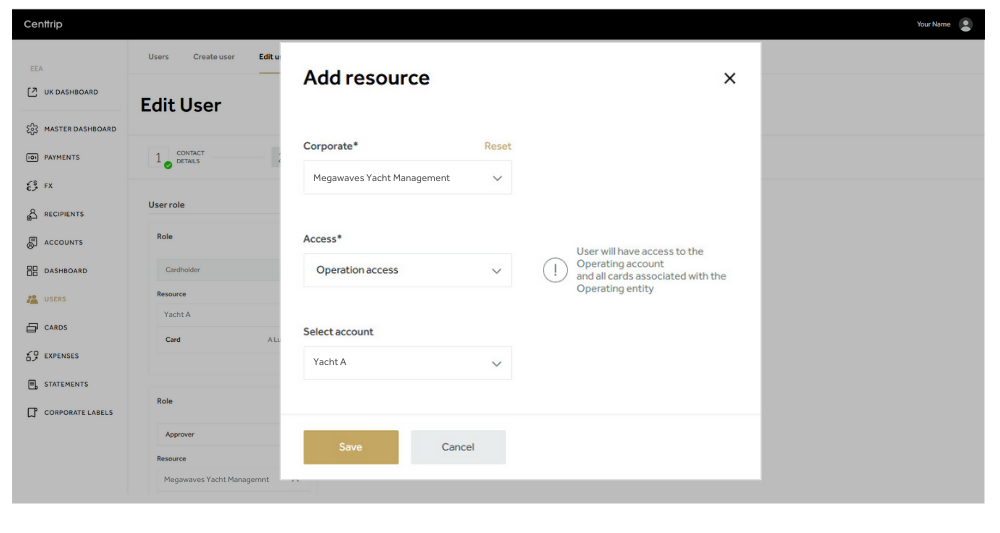
Once you have specified that a user requires approval(s) on payments, you then need to set up at least the same number of Approvers.
How to create an Approver
Approvers can be set up within your account, by a Super Administrator. You can nominate an existing user, or set up a new user to approve payments.
- Sign into your EEA Centtrip account and click on USERS in the left-hand menu.
- Click Create user to add a new Approver, or locate an existing user and click the Edit icon in the far right column.

- Complete the user details or, for an existing user, scroll down to the bottom and click Next.
- Click +Add new role and select Approver from the dropdown menu. Then, Add resource.
.png)
- Select the relevant corporate account and the access type. Selecting 'Corporate access' means the user can approve payments across all accounts, whereas 'Operation access' means they can approve payments for the specific operating accounts you select. Then Save.
.png)
Note - Approvers cannot approve their own payments.