How do I add funds to my Centtrip account?
Discover insights on key topics that enhance understanding and offer practical knowledge for everyday applications.
To get started and enjoy all the benefits of your account, you’ll first need to add funds. For security and regulatory reasons, we only accept funds from approved sources. These include:
- Your nominated corporate bank account (your ‘source of funds’), or
- An Approved Third Party that has been verified and authorised in advance.
Funds sent from unapproved sources may be delayed or rejected.
How do I transfer funds from my corporate bank account?
Which Centtrip platform are you using?
To start enjoying all your account benefits, you need to ensure you have sufficient funds. You can check your current balances from your account homepage and transfer funds to your Centtrip account using the bank details provided on the Load Account page.
Watch this 2-minute video:
- From the Load Account page, use the dropdown menu to select the currency you want to load into your Centtrip account.
- Note down the account details and payment reference starting with CENT.
- Log into the corporate bank account you would like to send funds from and make a transfer using the details you noted.
- Please note: funds may only be transferred from an account in the same name as your Centtrip account, unless funds are sent from an Approved Third Party.
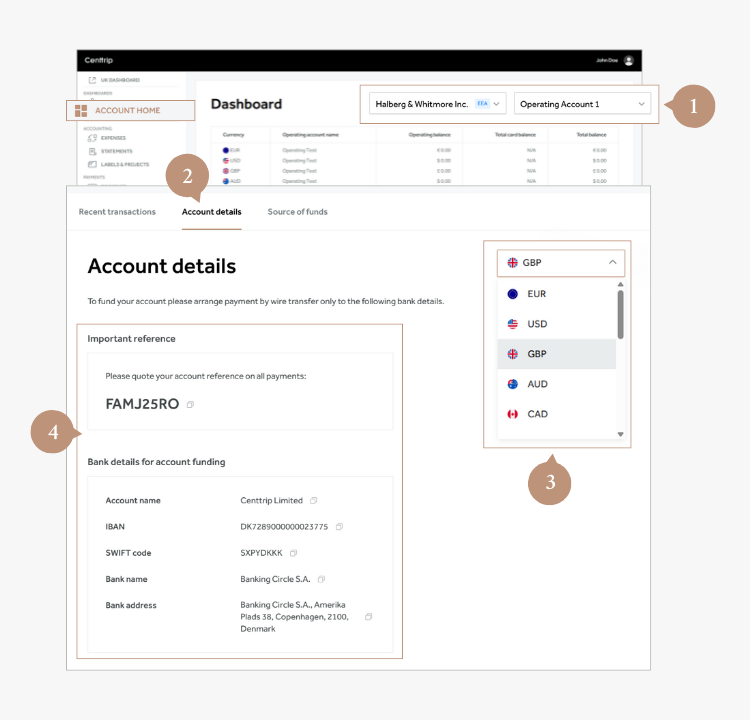
- Sign into your Centtrip Global account and visit your Account Home.
- Scroll down to the Recent transactions section of the screen.
- Switch to the Account details tab to view the correct payment details.
- Choose the currency you wish to load (if applicable).
How to move funds between your operating accounts
Once funds are received in your Centtrip account, you can use the Quick Transfer feature to move funds between operating accounts (see below) or load your Centtrip cards.
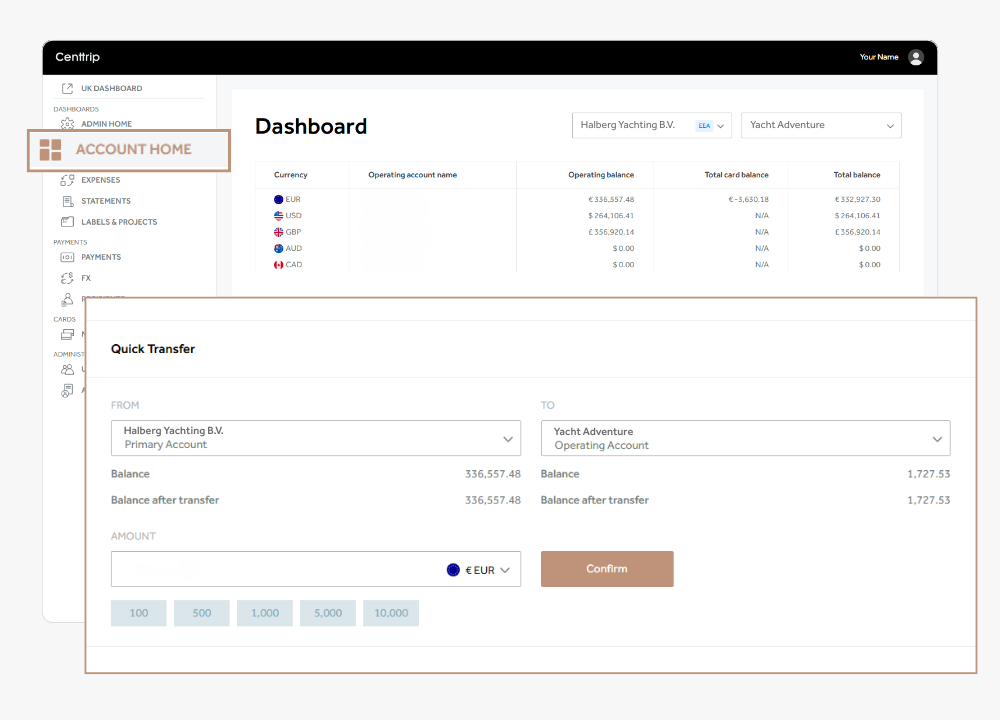
- Scroll down to the Quick Transfer feature under ACCOUNT HOME
- Use the dropdown boxes to select the accounts you want to transfer funds FROM and TO.
- Enter a value into the AMOUNT box and check the balances look correct.
- Click Confirm to move your funds instantly.
How do I set up an Approved Third Party?
How to set up an Approved Third Party:
- Submit an Approved Third Party Application for the intended payee.
- Wait for written confirmation from Centtrip before instructing the payment.
- If your request is approved, the sender will be set up as an Approved Third Party (ATP) in our system. They can then send payments to your Centtrip account.